



 Sign In


Lang: en | Section: blog | Slug: instructions-replacing-evolis-print-head | Action: | Cart: 0 | Currency: USD | Err Code: none | MSG: checksum created.
Signed In: S-No | checksum: C-No | apt_id: S-none | cart key: S-none | pli_key: S-none
Signed In: S-No | checksum: C-No | apt_id: S-none | cart key: S-none | pli_key: S-none
Archive
All PostsOctober 2024June 2024February 2024January 2024November 2023October 2023August 2023April 2023March 2023February 2023January 2023December 2022July 2022May 2022December 2021November 2021October 2021September 2021August 2021July 2021June 2021May 2021April 2021March 2021February 2021January 2021December 2020November 2020October 2020July 2020May 2020April 2020March 2020February 2020January 2020October 2019September 2019July 2019March 2019February 2019October 2018September 2018August 2018July 2018June 2018March 2018February 2018January 2018December 2017November 2017July 2017June 2017April 2017February 2017January 2017August 2016June 2016February 2016November 2015October 2015September 2015July 2015June 2015January 2015November 2014October 2014September 2014August 2014July 2014June 2014May 2014April 2014February 2014January 2014October 2013September 2013July 2013February 2013October 2012September 2012May 2012January 2012November 2011July 2011February 2011January 2011December 2010October 2010April 2010February 2010January 2010December 2009September 2009February 2009July 2008July 2007April 2007April 2006March 2006November 2005May 2005October 2004August 2004June 2004May 2004April 2004March 2004December 2003May 2002November 2000How to Replace an Evolis Print Head
- Always print a Technical Test Card before removing an old print head. This card must be sent inwith any head being evaluated for warranty replacement.
a. This can be done by going to the Start Menu on your computer => choosing “Control Panel” => choosing “Printers and Faxes” => right click on the Evolis printer and choose “Properties”. Then click on the “Tools” tab and click STT card or Technical Test card. A card and ribbon must be present to run this card.
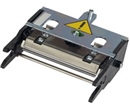
- After the Technical Test Card is printed, unplug the power from the printer. Open the hood and remove the print head. This can be done by pressing against the back metal spring loaded plate with one hand and twisting the print head out with the other. The print head should release easily and require little or no force.
- Then remove the wire connecting the print head to the printer. The wire to remove is the one going into the print head. Simply, pinch the wire with your fingers and pull.
- Now you can connect the new print head wire and insert the print head into the printer. You should hear a “click” as you insert the new head and press it into place.
- Now you must align the new print head number with the printer. Failure to do this will void warranty and can cause the print head to fail. Start in the printer driver under the “Tools” tab (instructions on getting to the driver in section 1a).
- Click on “Dialogue with Printer”. Here you will see a command box. You will need to enter the command: “Pkn;” followed by the new print head number and then press enter on your computer.
a. Example: Pkn;265‐B9200852‐B
- If the command was inputted properly you will get a cleaning light blinking on your printer. You can now remove the ribbon and cards and insert a cleaning card. Press the white lit button on your printer and it will automatically run a cleaning cycle. Your print head is now installed properly.
- The old print head and Technical Test card must both be submitted for any warranty credit to be received.
Tag: evolis, print head
Customer Favorites
$550.00You save 18.36%$449.00