



 Sign In


Lang: en | Section: blog | Slug: how-to-load-the-print-ribbon-cartridge-in-your-entrust-sigma-ds1-or-ds2-printer | Action: | Cart: 0 | Currency: USD | Err Code: none | MSG: checksum exist, not signed in.
Signed In: S-No | checksum: C-Yes | apt_id: S-none | cart key: S-none | pli_key: S-none
Signed In: S-No | checksum: C-Yes | apt_id: S-none | cart key: S-none | pli_key: S-none
Archive
All PostsOctober 2024June 2024February 2024January 2024November 2023October 2023August 2023April 2023March 2023February 2023January 2023December 2022July 2022May 2022December 2021November 2021October 2021September 2021August 2021July 2021June 2021May 2021April 2021March 2021February 2021January 2021December 2020November 2020October 2020July 2020May 2020April 2020March 2020February 2020January 2020October 2019September 2019July 2019March 2019February 2019October 2018September 2018August 2018July 2018June 2018March 2018February 2018January 2018December 2017November 2017July 2017June 2017April 2017February 2017January 2017August 2016June 2016February 2016November 2015October 2015September 2015July 2015June 2015January 2015November 2014October 2014September 2014August 2014July 2014June 2014May 2014April 2014February 2014January 2014October 2013September 2013July 2013February 2013October 2012September 2012May 2012January 2012November 2011July 2011February 2011January 2011December 2010October 2010April 2010February 2010January 2010December 2009September 2009February 2009July 2008July 2007April 2007April 2006March 2006November 2005May 2005October 2004August 2004June 2004May 2004April 2004March 2004December 2003May 2002November 2000How to Load the Print Ribbon Cartridge in your Entrust Sigma DS1 or DS2 Printer
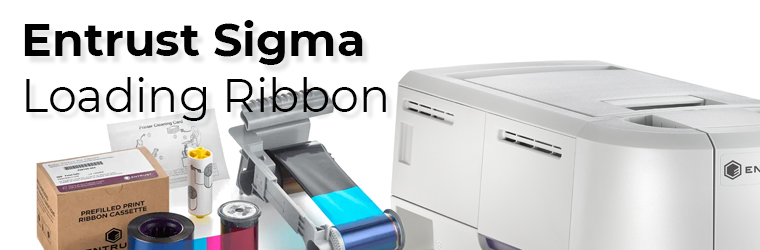
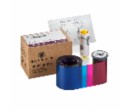
Deliver high-quality results while optimizing the performance of your system. We engineer superior performance and reliability into every system-matched supply item we offer, meeting or exceeding industry standards. The result is consistent printing, brilliant image quality, high security, and exceptional performance for your card program.
Instructions
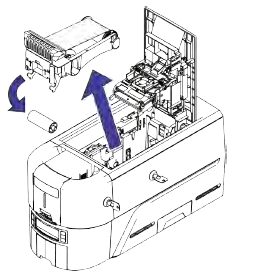
- Open the printer cover and remove the print ribbon cartridge.
- Remove the used ribbon spools and cleaning roller from the ribbon cartridge.
- Discard the used supplies.
- Load the print ribbon.
- Load a full roll of print ribbon (the purple spool) onto the purple spindle closest to the cartridge handle until it clicks into place.
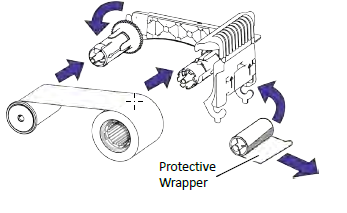
- Place the silver take-up spool on the silver take-up spindle until it clicks into place.
- Wind the take-up spool counterclockwise one full turn.
- Load a full roll of print ribbon (the purple spool) onto the purple spindle closest to the cartridge handle until it clicks into place.
- Load the cleaning roller on the ribbon cartridge.
- Remove the protective wrapper from the cleaning roller.
- Load a new cleaning roller with each new roll of print ribbon. Replace it between ribbon changes if you notice debris on the printed cards or the cleaning roller is no longer sticky.
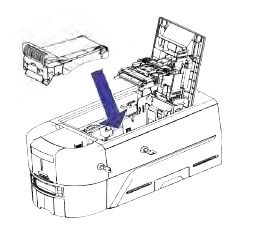
- Install the print ribbon cartridge in the printer.
- Hold the ribbon cartridge by the handle and lower it into the printer with the handle toward the front of the printer.
- Position the ribbon cartridge in the guides.
- Close the printer cover. Press down on the ridges on the front of the cover to ensure it latches completely.
Customer Favorites
$263.00You save 24.33%$199.00