



 Sign In


Lang: en | Section: blog | Slug: disable-pre-feed-card-value-line-zxp-series-printers | Action: | Cart: 0 | Currency: USD | Err Code: none | MSG: checksum created.
Signed In: S-No | checksum: C-No | apt_id: S-none | cart key: S-none | pli_key: S-none
Signed In: S-No | checksum: C-No | apt_id: S-none | cart key: S-none | pli_key: S-none
Archive
All PostsOctober 2024June 2024February 2024January 2024November 2023October 2023August 2023April 2023March 2023February 2023January 2023December 2022July 2022May 2022December 2021November 2021October 2021September 2021August 2021July 2021June 2021May 2021April 2021March 2021February 2021January 2021December 2020November 2020October 2020July 2020May 2020April 2020March 2020February 2020January 2020October 2019September 2019July 2019March 2019February 2019October 2018September 2018August 2018July 2018June 2018March 2018February 2018January 2018December 2017November 2017July 2017June 2017April 2017February 2017January 2017August 2016June 2016February 2016November 2015October 2015September 2015July 2015June 2015January 2015November 2014October 2014September 2014August 2014July 2014June 2014May 2014April 2014February 2014January 2014October 2013September 2013July 2013February 2013October 2012September 2012May 2012January 2012November 2011July 2011February 2011January 2011December 2010October 2010April 2010February 2010January 2010December 2009September 2009February 2009July 2008July 2007April 2007April 2006March 2006November 2005May 2005October 2004August 2004June 2004May 2004April 2004March 2004December 2003May 2002November 2000How to Disable the Pre-Feed Card on Value Line and ZXP Series Printers
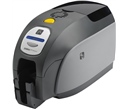
Zebra Value Line and ZXP Series Printers (ZXP 1 and ZXP 3) has a feature that pre-feed a card into the printer so it's faster to print when a job is sent. The main benefit of this function is to increase printing speed and output. However it create two problems:- When turning the printer On, it will eject the card and pre-feed a new one. So if you turn off the printer at the end of the day and turn it on the next day, it eject a card every time. It's quite annoying after a while.
- When it pre-feed the card, the card stop just under the sticky roller and wait there. If it wait too long, the sticky roller will be so glue to the card that when the printer receive the command to print a card, the motor has problem moving the card and generate a "Mechanical error".
So because of the two problems, we recommend to turn off this pre-feed feature. You can do it by following those steps:
- Go to the Start Menu> Printers and Faxes (Windows XP) or Devices and Printers (Windows 7)
- Right click on your Zebra Card printer and select Properties (Windows XP) or Printer Properties (Windows 7)
- Go to the Device Settings tab
- Click on Tools or For Value line printers, click the Properties button
- In the Command to Send to Printer area, type "+PRF 0" to disable the pre-feed
- Click the Execute button; "ACK" should show under Printer Status to indicate the command was accepted successfully
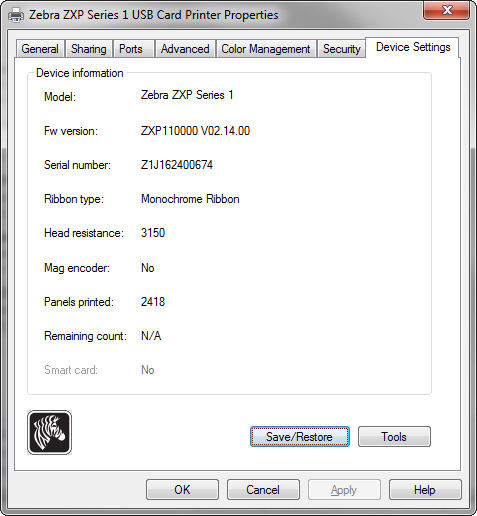
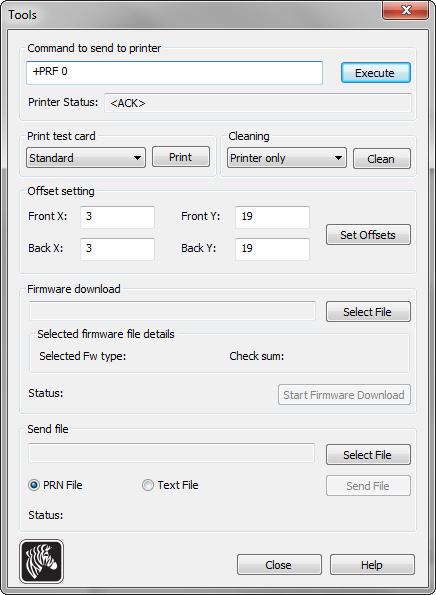
The disabled pre-feed should be in effect. You can confirm after you power-cycle the printer or after sending a print job. You can also type "+PRF 1" to turn it on again!
Tag: pre-feed card, zebra, zxp1, zxp3
Customer Favorites
$3,050.00You save 47.25%$1,609.00